Toast Notifications in React Native and Expo: A Complete Guide (Including Toasts Over Modals)
Success messages, promise toasts, undo buttons, upload progress and Modals, with react-native-toastify-expo
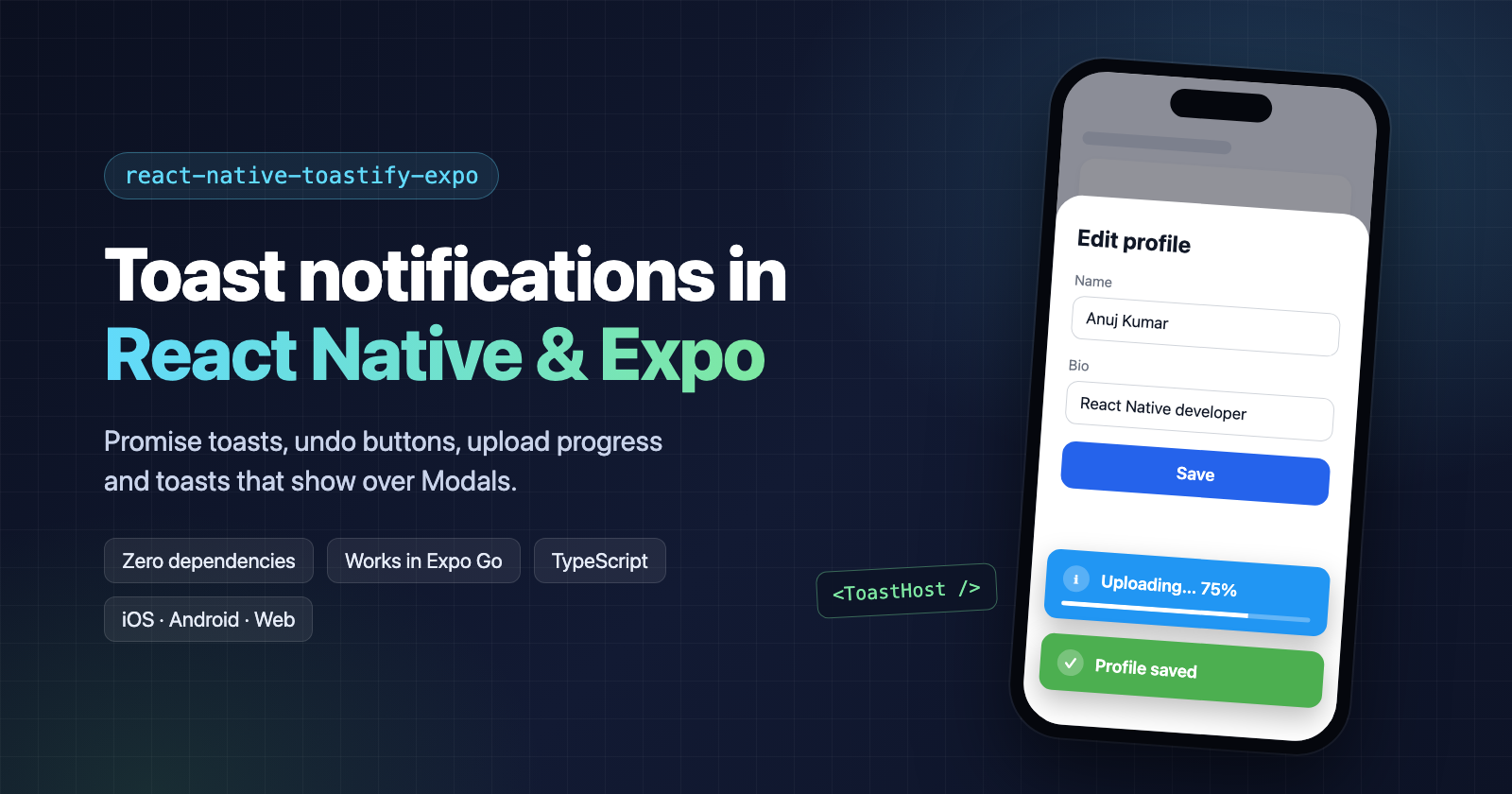
Almost every app needs to tell the user something quickly: "Saved", "You're offline", "Message deleted (Undo)". On the web we reach for a toast, and it just works. In React Native, I assumed toasts would be the easy part of the app. They weren't.
The problems I kept running into
While building React Native and Expo apps, the same toast issues came up again and again:
- Toasts hidden behind Modals. A user saves a form inside a
<Modal>, the app shows "Profile saved"… and nothing appears. The toast rendered, but behind the Modal, and nozIndexcould bring it forward. - Toasts under the notch. A hard-coded top offset looked fine on one phone and collided with the notch or the Dynamic Island on another.
- The keyboard covering toasts. Bottom toasts disappeared under the keyboard whenever a text field was focused, which is exactly when form errors show up.
- Only usable inside components. Most errors happen in API clients, stores and navigation code, where you can't call a React hook.
- One toast at a time. A second toast replaced the first, so messages got lost.
- Duplicate toasts. When the network dropped, ten failed requests meant ten "You're offline" toasts stacked on screen.
- The same loading boilerplate everywhere. Show "Saving…", wait for the request, hide it, show success or error. Around every single API call.
- Silent for screen readers. VoiceOver and TalkBack users never heard the message at all.
Each of these has a workaround, but together they meant a lot of copy-pasted glue code in every project.
So I built react-native-toastify-expo
I wanted one small library that handles all of this out of the box:
- Set up once, call from anywhere:
toast.success('Saved')works in components, API clients and stores. - Sensible defaults: safe-area insets, keyboard avoidance and screen-reader announcements are on without any configuration.
- Toasts over Modals with a single
<ToastHost />. - Zero dependencies and no native code, so it works in Expo Go, bare React Native and on the web.
That became react-native-toastify-expo. It's open source on GitHub, and version 1.3.0 covers every problem in the list above.
In this guide, we'll go through each of those problems and the code that solves it. Every example is copy-paste ready, and you can try all of them live in this Expo Snack, in your browser or on your phone with Expo Go.
What we'll cover
- Setup in two steps
- Showing toasts from anywhere (not only components)
- Promise toasts for API calls
- "Undo" buttons
- Upload progress with a toast that updates in place
- Avoiding duplicate toasts
- Showing toasts over a Modal
- Themes, custom types and fully custom layouts
1. Setup
Install the package:
npm install react-native-toastify-expo
It has no native code, so there's no pod install or linking, and it works in Expo Go.
Wrap your app in ToastProvider once, near the root:
// App.tsx
import { ToastProvider } from 'react-native-toastify-expo';
import { RootNavigator } from './navigation';

export default function App() {
  return (
    <ToastProvider>
      <RootNavigator />
    </ToastProvider>
  );
}
That's it. Now show a toast:
import { Button } from 'react-native';
import { toast } from 'react-native-toastify-expo';

export function SaveButton() {
  return <Button title="Save" onPress={() => toast.success('Saved!')} />;
}
There are four built-in types, each with its own color and icon:
toast.success('Profile updated');
toast.error('Something went wrong');
toast.warning('Please check your input');
toast.info('New version available');
Tip: If your app uses
react-native-safe-area-context(Expo and the React Native template ship it), toasts automatically clear the notch, the Dynamic Island and the home indicator. There's nothing to configure.
2. Show toasts from anywhere
Many toast libraries only work inside components through a hook. In real apps, though, errors happen in API clients, stores and navigation code. The toast object works anywhere once the provider is mounted:
// api/client.ts
import { toast } from 'react-native-toastify-expo';

export async function apiFetch<T>(url: string, init?: RequestInit): Promise<T> {
  const res = await fetch(url, init);
  if (res.status === 401) {
    toast.warning('Your session expired. Please sign in again.');
    throw new Error('Unauthorized');
  }
  if (!res.ok) {
    toast.error(`Request failed (${res.status})`);
    throw new Error(`HTTP ${res.status}`);
  }
  return res.json();
}
If you prefer hooks inside components, there's one too:
import { useToast } from 'react-native-toastify-expo';

function Profile() {
  const { showToast } = useToast();
  return <Button title="Copy link" onPress={() => showToast({ message: 'Link copied', type: 'success' })} />;
}
3. Promise toasts for API calls
A common pattern: show "Saving…" while a request runs, then switch to success or error. toast.promise does all three steps with one call:
async function onSubmit(values: FormValues) {
  await toast.promise(api.saveReport(values), {
    loading: 'Saving report…',
    success: (report) => `Saved "${report.name}"`,
    error: (err) => `Couldn't save: ${err.message}`,
  });
  navigation.goBack();
}
While the promise is pending, the toast shows a spinner. Because toast.promise returns the original promise, you can still await it and handle errors the way you normally would.
4. "Undo" buttons
Deleting something? Give the user a way back with an action button and a title:
function deleteMessage(message: Message) {
  store.remove(message.id);

  toast.info('The message was moved to the trash', {
    title: 'Message deleted',
    action: { label: 'Undo', onPress: () => store.restore(message) },
    duration: 6000,
  });
}
Pressing Undo runs your callback and dismisses the toast. Users can also tap or swipe a toast sideways to dismiss it, and holding a toast pauses its countdown, so a long message can be read without it vanishing.
5. Upload progress: update a toast in place
Instead of stacking "10%", "20%", "30%" toasts, show one toast and update it:
async function uploadPhoto(uri: string) {
  const id = toast.info('Uploading… 0%', { duration: Infinity });

  try {
    await uploader.upload(uri, {
      onProgress: (percent) => toast.update(id, { message: `Uploading… ${percent}%` }),
    });
    toast.update(id, { message: 'Upload complete', type: 'success', duration: 3000 });
  } catch {
    toast.update(id, { message: 'Upload failed', type: 'error', duration: 4000 });
  }
}
duration: Infinity keeps the toast on screen until we're done. Each toast.update changes the toast and restarts its countdown, so the final "Upload complete" stays for its full 3 seconds.
Want a visible countdown? Add showProgress: true to any toast, or <ToastProvider showProgress> to turn it on for all of them.
6. Avoid duplicate toasts
When the network drops, every failing request might try to show "You're offline". Give the toast an id, and showing it again updates the one on screen instead of stacking copies:
api.onNetworkError(() => {
  toast.error("You're offline", { id: 'network' });
});
You can also limit how many toasts appear at once:
<ToastProvider max={3}>
  <RootNavigator />
</ToastProvider>
When a fourth toast arrives, the oldest one in that position is dismissed.
7. Showing toasts over a Modal
This is the one that bites almost everyone. You have an "Edit profile" screen in a React Native <Modal>. The user taps Save, you call toast.success('Profile saved')… and nothing appears.
The toast did render, behind the Modal.
Why it happens
<Modal> isn't a normal view. On iOS it's presented as a separate view controller, and on Android it's a Dialog with its own window. Your toast provider renders in the app's main window, underneath the Modal. Raising zIndex doesn't help, because zIndex only orders views within the same window.
The fix: <ToastHost />
Add <ToastHost /> as the last child inside your Modal:
import { useState } from 'react';
import { Button, Modal, TextInput, View } from 'react-native';
import { toast, ToastHost } from 'react-native-toastify-expo';

export function EditProfileModal({ visible, onClose }: { visible: boolean; onClose: () => void }) {
  const [name, setName] = useState('');

  async function save() {
    try {
      await toast.promise(api.updateProfile({ name }), {
        loading: 'Saving…',
        success: 'Profile saved',
        error: 'Could not save your profile',
      });
    } catch {
      // The error toast has already told the user.
    }
  }

  return (
    <Modal visible={visible} animationType="slide" onRequestClose={onClose}>
      <View style={{ flex: 1, padding: 24, gap: 12 }}>
        <TextInput value={name} onChangeText={setName} placeholder="Your name" />
        <Button title="Save" onPress={save} />
        <Button title="Close" onPress={onClose} />

        <ToastHost />
      </View>
    </Modal>
  );
}
While the Modal is open, toasts render inside it, on top of everything. When it closes, they go back to the main screen automatically. Some details:
- No extra configuration.
ToastHosttakes no props. Your theme, custom types, offsets and keyboard handling fromToastProviderall still apply. - Nested Modals work. If a second Modal opens with its own
<ToastHost />, toasts move there. When it closes, they move back to the first. - Same API everywhere. You still call
toast.success(). Nothing in your API client or store needs to know whether a Modal is open.
Under the hood, ToastProvider keeps a single list of toasts. Each ToastHost registers itself when it mounts, and the most recently mounted one renders the toasts. React context flows into a Modal's children even though they live in a separate native window, and that's what makes this possible.
8. Make it yours: themes, custom types and layouts
Themes
<ToastProvider theme="system">  {/* "colored" (default), "light", "dark" or "system" */}
  <RootNavigator />
</ToastProvider>
light and dark use a neutral card with a colored accent, and system follows the device's dark mode setting.
Custom types
Register your own types with a color and an icon, or restyle the built-in ones:
<ToastProvider
  types={{
    upload: { backgroundColor: '#6200ee', icon: '⬆' },
    success: { backgroundColor: '#00796b' },
  }}
>
  <RootNavigator />
</ToastProvider>
toast.show({ type: 'upload', message: 'Uploading photo…' });
Fully custom layout
Need a chat-style notification with an avatar and a reply button? Use render. You still get the animations, swipe-to-dismiss and the timer:
toast.show({
  message: 'Jane: are we still on for lunch?',
  position: 'top',
  render: ({ message, hide }) => (
    <View style={styles.card}>
      <Image source={{ uri: jane.avatarUrl }} style={styles.avatar} />
      <Text style={styles.text}>{message}</Text>
      <Button
        title="Reply"
        onPress={() => {
          navigation.navigate('Chat', { userId: jane.id });
          hide();
        }}
      />
    </View>
  ),
});
Pass render to ToastProvider instead, and every toast in your app uses your layout.
Provider defaults
Set your app-wide defaults once:
<ToastProvider position="top" duration={4000} max={3} offset={{ top: 8 }} theme="system">
  <RootNavigator />
</ToastProvider>
Good defaults you don't have to think about
- Keyboard: bottom toasts move above the keyboard while it's open, on both iOS and Android.
- Accessibility: VoiceOver and TalkBack announce toasts. If your app is translated, set
accessibilityHinton the provider so the "Double tap to dismiss" hint is read in the user's language. - Tablets and web: toasts are capped at a readable width (480 by default, set with
maxWidth) and centered.
Wrapping up
Here's everything we built:
| Need | API |
|---|---|
| Quick message | toast.success('Saved') |
| Loading → result | toast.promise(promise, { loading, success, error }) |
| Undo | action: { label: 'Undo', onPress } |
| Progress | toast.update(id, { message }) |
| No duplicates | id: 'network' |
| Over a Modal | <ToastHost /> inside the Modal |
| Look and feel | theme, types, render |
Try it:
- 📱 Live demo in Expo Snack: runs in your browser, or on your phone with Expo Go
- 📦 npm: react-native-toastify-expo
- ⭐ GitHub: anuj-kumary/react-native-toastify
The project is open source, and contributions are very welcome. There are good first issues for anyone who wants to start. If the library saves you some time, a star on GitHub helps other developers find it.
Got questions, or a toast pattern I didn't cover? Leave a comment below. 👇
About the author
- Web developer specializing in React and it's ecosystem with one year of experience working in startups. Ability to translate business requirements into innovative software solutions.
Comments
Join the discussionAmazing!